
Workout plan builder for personal trainers
Create a complete strength training program for a client in a couple of minutes, or build every day yourself. Each plan follows the goal’s sets, reps, load and rest, and stays fully editable.
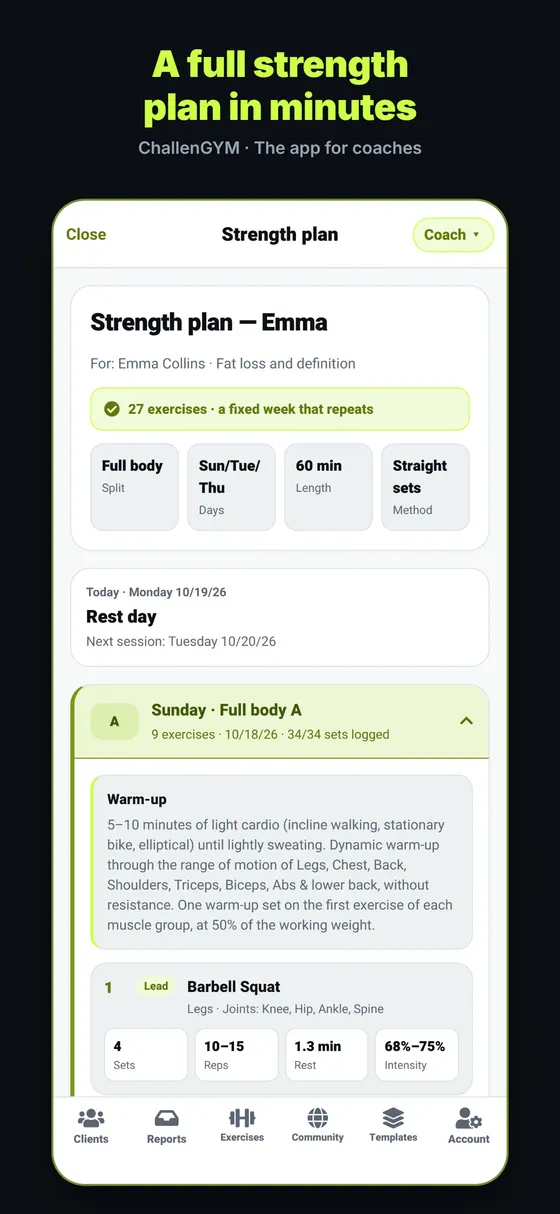
Quick wizard: two screens, a full program
Choose the goal and level, then the training days per week, session length, available equipment and any limitations. Answers from the client’s intake are filled in for you. The wizard recommends a split and orders the exercises big muscles first, compound moves before isolation.
- Six goals: muscle growth, strength, muscular endurance, fat loss, general health and return to activity
- Beginner, intermediate or advanced; 2 to 6 days a week; 30 to 75 minute sessions
- Full gym, machines only, free weights or home with minimal equipment
Six splits and six loading methods
Full body, A/B, A/B/C, upper/lower, push/pull/legs and a five-day split with one muscle group a day. Sets can be straight sets, pyramid, reverse pyramid, supersets, circuits or drop sets, matched to the client’s level.
Or build it yourself
Create one to seven named training days with up to 20 exercises each, picked from the 102-exercise library, your own exercises or the community’s. Set sets, reps, rest, optional RIR and a note for each exercise, then reorder or swap in seconds. The same editor opens any plan the wizard made.
Your client trains from the plan
The client sees today’s workout in their app, opens any exercise for the how-to and logs sets, reps and weights. You see what was done, and the plan library gives you eight ready strength templates to start from.
Frequently asked questions
How are sets, reps and rest chosen?
Each goal has its own ranges — for example 3–4 sets of 6–12 reps with 60–120 seconds of rest for muscle growth, or 3–6 sets of 3–6 reps with longer rest for strength. You can change every number.
Can I add my own exercises?
Yes. Add an exercise with its muscle group, instructions, cues, muscles and equipment, and attach a photo or video. It appears under “Mine” and can be used in any plan.
Can I reuse a plan for several clients?
Yes. Save any plan as a template, start from a template recommended by the ChallenGYM team, or share your plan to the library without any client details.
More free tools for coaches
- Client managementSee who needs you today, onboard clients with signed forms and follow every check-in.
- Cardio plan builderHeart-rate-zone cardio plans from walking to half marathon, with progression built in.
- Nutrition plan builderCalorie and macro targets with a daily menu — general healthy-eating guidance.
- Exercise library102 strength exercises with how-to steps, cues, common mistakes and muscles worked.
- Why it’s freeNo subscription, no ads, no credit card — what “free for life” means.
Get ChallenGYM free for life
Download it for iPhone or Android. No subscription, no ads, no credit card.